















Introduction
Managing SQL Server Reporting Services (SSRS) in large organizations can quickly become complex. In my experience working with more than 1,000 financial reports spanning multiple regions, countries, databases, and development teams, it became clear that manually tracking report definitions, parameters, subscriptions, and execution history is not sustainable.
As the reporting landscape grows, administrators and developers need deeper insight into how reports are built, scheduled, executed, and consumed. This article focuses on gaining that insight by querying the SSRS ReportServer database directly.
Why Traditional SSRS Management Falls Short
When the number of reports increases, the SSRS web portal becomes increasingly difficult to manage. Manually clicking through folders to inspect report parameters, schedules, or subscription definitions is time-consuming and error prone.
For analysts and developers, relying solely on the SSRS dashboard is not realistic when:
- Hundreds of reports exist
- Multiple teams own different reports
- Reports serve different departments or countries
- Audits, migrations, or archiving projects are required
What You Need to Know About Your Reports
To manage SSRS effectively, you must be able to analyze every critical aspect of your reports, including:
Which SQL statements each report executes
- How reports are scheduled
- Which subscriptions are defined
- Who receives report outputs
- Which parameters are used
- Whether executions succeed or fail
- How frequently reports are executed
The most reliable way to obtain this information is by querying the ReportServer database.
Why Look Inside the ReportServer Database?
By querying the ReportServer database directly, SSRS administrators can:
- Audit report queries and data sources
- Review subscription schedules and delivery methods
- Identify failing or inactive subscriptions
- Monitor execution frequency and performance
- Find reports that are no longer used
- Extract complete metadata for migration or archiving projects
Over the past decade working with SSRS, I have built a toolkit of SQL queries that provide this visibility. The following sections present the most useful queries and explain when and why to use them.
Real-World Scenario: Migrating a Reporting System
One customer migrated their reporting environment to the cloud and replaced SSRS with a different reporting tool. However, they wanted to retain their existing databases and continue using the exact same SELECT statements that their SSRS reports relied on.
The challenge was to extract complete metadata for all existing reports, including:
- All SQL queries used by reports
- All datasets and data sources
- All parameters and subscriptions
- Execution and delivery details
This required a systematic approach using the ReportServer database.
Let’s see how I solved these problems.
1. Extracting Report Definitions and SQL Statements
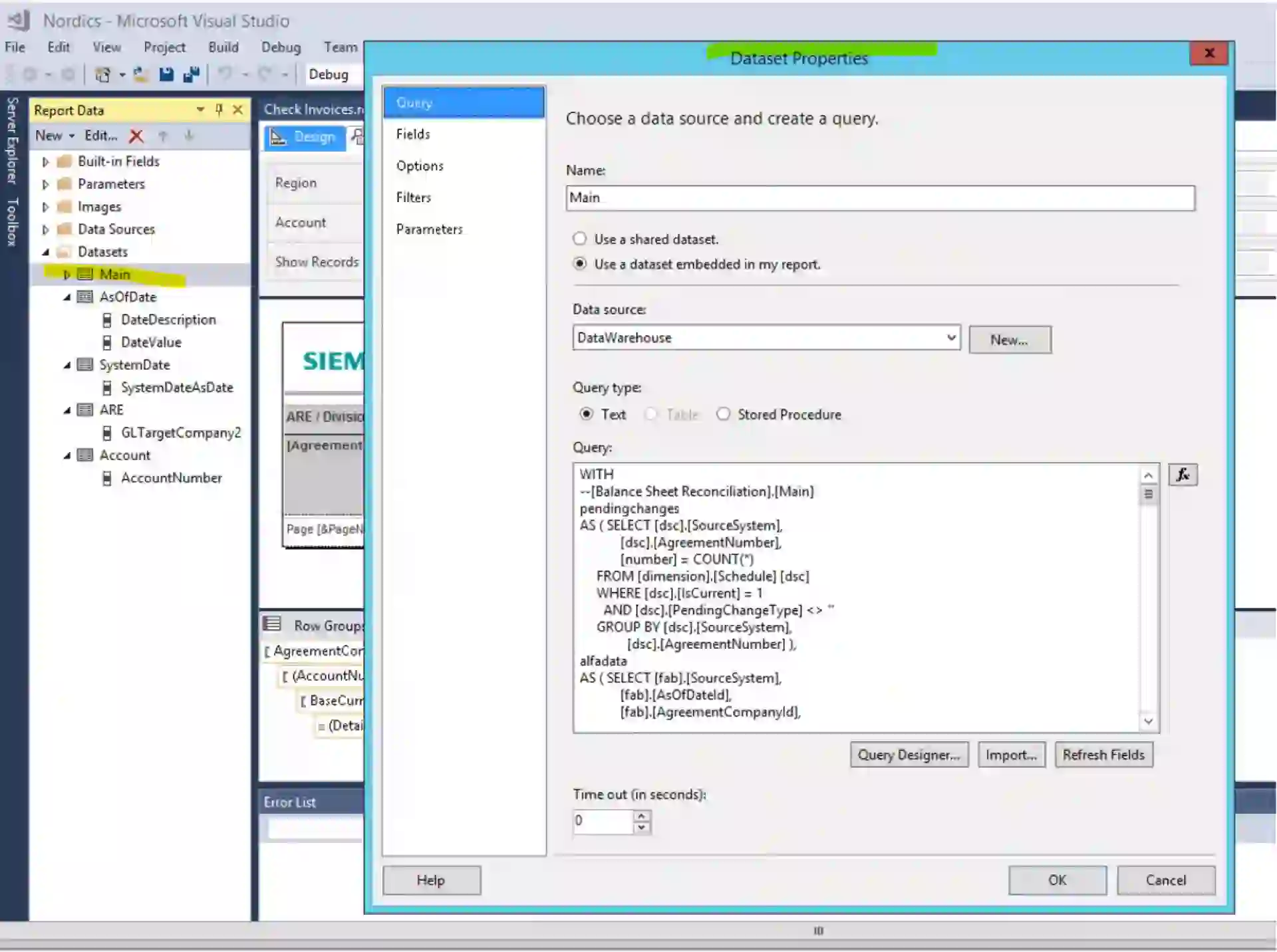
When working manually, report details are typically inspected by opening report definitions in Visual Studio (or report builder). This approach does not scale.
Instead, SSRS stores report definitions in the ReportServer.dbo.Catalog table as compressed XML (RDL format). By decoding this content, we can analyze all reports programmatically.
Getting Full Report Definitions
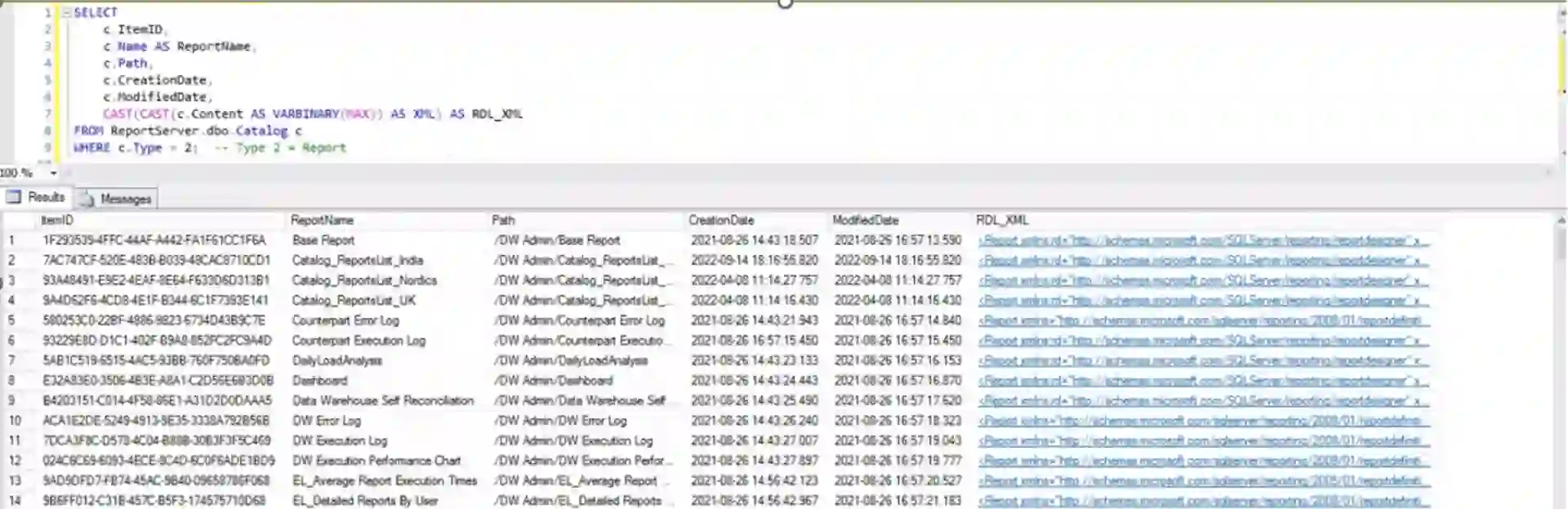
The following query retrieves full RDL definitions along with report metadata such as creation and modification dates:
SELECT
c.ItemID,
c.Name AS ReportName,
c.Path,
c.CreationDate,
c.ModifiedDate,
CAST(CAST(c.Content AS VARBINARY(MAX)) AS XML) AS RDL_XML
FROM ReportServer.dbo.Catalog c
WHERE c.Type = 2; -- Type 2 = Report
This query retrieves the raw RDL definition for each report, including metadata such as creation and modification dates.
This output provides:
- Report ID in the catalog
- Report name
- Report path in the SSRS portal
- Creation date
- Modification date
- Full RDL XML definition
By inspecting the RDL XML, you can identify data sources, datasets, parameters, descriptions, and SQL queries used by the report.
2. Extracting Datasets, SQL Queries, and Data Sources
The next step is extracting core SQL statements, dataset definitions, and data sources directly from RDL files stored in the catalog.
;WITH cte AS (
SELECT [path], [name] AS Report_Name,
CONVERT(XML, CONVERT(VARBINARY(MAX), content)) AS rdl
FROM reportserver.dbo.catalog
)
SELECT
LEFT([Path], LEN([path]) - CHARINDEX('/',REVERSE([Path])) + 1) AS Report_Path,
Report_Name,
DataSetNameQ.N.value('@Name', 'nvarchar(128)') AS DataSetName,
DataSrsNameQ.N.value('(*:DataSourceName/text())[1]', 'nvarchar(128)') AS DataSourceName,
ISNULL(DataSrsNameQ.N.value('(*:CommandType/text())[1]', 'nvarchar(128)'), 'T-SQL') AS CommandType,
DataSrsNameQ.N.value('(*:CommandText/text())[1]', 'nvarchar(max)') AS CommandText
FROM cte AS mainSelect
CROSS APPLY mainSelect.rdl.nodes('/*:Report/*:DataSets/*:DataSet') AS DataSetNameQ (N)
CROSS APPLY DataSetNameQ.N.nodes('*:Query') AS DataSrsNameQ (N)
ORDER BY Report_Path, Report_Name, DataSetName, DataSourceName, CommandType, CommandText;
This query returns:
- Report path and name
- Dataset name
- Data source name
- Command type (e.g., T-SQL)
- SQL statement used in the report
This information is invaluable for auditing, refactoring, or migrating large numbers of reports.
3. Investigating Subscriptions
Subscriptions are a critical SSRS feature that automate report delivery. Subscription data is stored across multiple tables, including Subscriptions, ReportSchedule, and Schedule.
Basic Subscription Information
The following query extracts key subscription details:
SELECT
s.SubscriptionID,
c.Name AS ReportName,
c.Path,
s.Description AS SubscriptionDescription,
s.LastStatus,
s.LastRunTime,
s.DeliveryExtension,
s.EventType,
s.MatchData AS ScheduleDefinition, -- XML
s.Parameters, -- XML
u.UserName AS CreatedBy
FROM ReportServer.dbo.Subscriptions s
JOIN ReportServer.dbo.Catalog c ON s.Report_OID = c.ItemID
JOIN ReportServer.dbo.Users u ON s.OwnerID = u.UserID
ORDER BY c.Name;
From this output, you can determine:
- Which reports have subscriptions
- Where report outputs are delivered
- When subscriptions last ran
- Whether execution succeeded or failed
- Who owns each subscription
Readable Schedule Information
To better understand scheduling behavior and execution status, the following query provides readable scheduling details:
SELECT
c.Name AS ReportName,
c.Path,
s.Description,
s.InactiveFlags,
sch.NextRunTime,
sch.LastRunTime,
sch.LastRunStatus,
s.Parameters
FROM ReportServer.dbo.Subscriptions s
JOIN ReportServer.dbo.Catalog c ON s.Report_OID = c.ItemID
JOIN ReportServer.dbo.ReportSchedule rs ON s.SubscriptionID = rs.SubscriptionID
JOIN ReportServer.dbo.Schedule sch ON rs.ScheduleID = sch.ScheduleID;
This allows administrators to diagnose failed or inactive subscriptions efficiently.
Subscription Inactive Flags
The InactiveFlags column indicates the subscription status or explain why it is not running:
- 0 – Active
- 1 – Email or file share removed
- 2 – Missing data source
- 4 – Missing parameter
- 8 – Invalid parameter
- 128 – Disabled by user
Subscription Parameters and Values
The following query extracts detailed parameter information, and provides visibility into:
- Parameter names and values
- Execution timing
- Delivery location or recipients
- Subscription language and status
defined for subscriptions:
;WITH
[Sub_Parameters] AS
(
SELECT
[SubscriptionID],
[Parameters] = CONVERT(XML,a.[Parameters])
FROM [Subscriptions] a
),
[MySubscriptions] AS
(
SELECT DISTINCT
[SubscriptionID],
[ParameterName] = QUOTENAME(p.value('(Name)[1]', 'nvarchar(max)')),
[ParameterValue] = p.value('(Value)[1]', 'nvarchar(max)')
FROM
[Sub_Parameters] a
CROSS APPLY [Parameters].nodes('/ParameterValues/ParameterValue') t(p)
),
[SubscriptionsAnalysis] AS
(
SELECT
a.[SubscriptionID],
a.[ParameterName],
[ParameterValue] =
(SELECT
STUFF((
SELECT [ParameterValue] + ', ' as [text()]
FROM [MySubscriptions]
WHERE
[SubscriptionID] = a.[SubscriptionID]
AND [ParameterName] = a.[ParameterName]
FOR XML PATH('')
),1, 0, '')
+'')
FROM [MySubscriptions] a
GROUP BY a.[SubscriptionID],a.[ParameterName]
)
SELECT
a.[SubscriptionID],
c.[UserName]AS Owner,
b.Name,
b.Path,
a.[Locale],
a.[InactiveFlags],
d.[UserName] AS Modified_by,
a.[ModifiedDate],
a.[Description],
a.[LastStatus],
a.[EventType],
a.[LastRunTime],
a.[DeliveryExtension],
a.[Version],
e.[ParameterName],
LEFT(e.[ParameterValue],LEN(e.[ParameterValue])-1) as [ParameterValue],
SUBSTRING(b.PATH,2,LEN(b.PATH)-(CHARINDEX('/',REVERSE(b.PATH))+1)) AS ProjectName
FROM
[Subscriptions] a
INNER JOIN [Catalog] AS b
ON a.[Report_OID] = b.[ItemID]
LEFT OUTER JOIN [Users] AS c
ON a.[OwnerID] = c.[UserID]
LEFT OUTER JOIN [Users] AS d
ON a.MODIFIEDBYID = d.Userid
LEFT OUTER JOIN [SubscriptionsAnalysis] AS e
ON a.SubscriptionID = e.SubscriptionID
order by 17;
4. Monitoring Execution History
Execution history helps identify performance bottlenecks, unused reports, and operational issues.
Execution logs answer questions such as:
- Which reports ran today?
- Which executions failed?
- How long do reports take to run?
- Which reports are rarely or never used?
Latest Report Executions
The following query retrieves detailed execution information:
SELECT
InstanceName,
C.Name as ReportName,
COALESCE(CASE(ReportAction)WHEN 11 THEN AdditionalInfo.value('(AdditionalInfo/SourceReportUri)[1]', 'nvarchar(max)')
ELSE C.Path END, 'Unknown') AS ItemPath,
--UserName,
--ExecutionId,
CASE(RequestType)
WHEN 0 THEN 'Interactive'
WHEN 1 THEN 'Subscription'
WHEN 2 THEN 'Refresh Cache'
ELSE 'Unknown'
END AS RequestType,
-- SubscriptionId,
Format,
Parameters,
CASE(ReportAction)
WHEN 1 THEN 'Render'
WHEN 2 THEN 'BookmarkNavigation'
WHEN 3 THEN 'DocumentMapNavigation'
WHEN 4 THEN 'DrillThrough'
WHEN 5 THEN 'FindString'
WHEN 6 THEN 'GetDocumentMap'
WHEN 7 THEN 'Toggle'
WHEN 8 THEN 'Sort'
WHEN 9 THEN 'Execute'
WHEN 10 THEN 'RenderEdit'
WHEN 11 THEN 'ExecuteDataShapeQuery'
WHEN 12 THEN 'RenderMobileReport'
ELSE 'Unknown'
END AS ItemAction,
TimeStart,
TimeEnd,
TimeDataRetrieval,
TimeProcessing,
TimeRendering,
CASE(Source)
WHEN 1 THEN 'Live'
WHEN 2 THEN 'Cache'
WHEN 3 THEN 'Snapshot'
WHEN 4 THEN 'History'
WHEN 5 THEN 'AdHoc'
WHEN 6 THEN 'Session'
WHEN 7 THEN 'Rdce'
ELSE 'Unknown'
END AS Source,
Status,
ByteCount,
[RowCount],
AdditionalInfo
FROM ExecutionLogStorage EL WITH(NOLOCK)
LEFT OUTER JOIN Catalog C WITH(NOLOCK) ON (EL.ReportID = C.ItemID)
- TimeDataRetrieval, TimeProcessing, and TimeRendering help isolate bottlenecks.
- Status identifies success or failure.
- RequestType describe is report executed interactive by user or with subscription
- Format – render output format
- AdditionalInfo in xml form help you understand information about scalability time, memory usage, processing, pagination, etc.
<AdditionalInfo>
<ProcessingEngine>2</ProcessingEngine>
<ScalabilityTime>
<Pagination>0</Pagination>
<Processing>0</Processing>
</ScalabilityTime>
<EstimatedMemoryUsageKB>
<Pagination>5</Pagination>
<Processing>78661</Processing>
</EstimatedMemoryUsageKB>
<DataExtension>
<SQL>1</SQL>
</DataExtension>
<Connections>
<Connection>
<ConnectionOpenTime>261</ConnectionOpenTime>
<DataSets>
<DataSet>
<Name>Main</Name>
<RowsRead>48658</RowsRead>
<TotalTimeDataRetrieval>4167</TotalTimeDataRetrieval>
<ExecuteReaderTime>4165</ExecuteReaderTime>
</DataSet>
</DataSets>
</Connection>
</Connections>
</AdditionalInfo>
Reports Not Executed in the Last 90 Days
This query identifies reports that have not been executed for an extended period and helps identify candidates for cleanup or archival. Output provides you additional information who and how it was executed for last time (interactive, per subscription, etc.)
Of course you can choose your own number of days:
SELECT DISTINCT a.*, l.UserName
FROM (
SELECT c.[name] as reportName,
SUBSTRING(SUBSTRING(path, CHARINDEX('/', path) + 1, LEN(path)),0,
CHARINDEX('/',SUBSTRING(path, CHARINDEX('/', path) + 1, LEN(path)))) Folder,
CASE(RequestType)
WHEN 0 THEN 'Interactive'
WHEN 1 THEN 'Subscription'
WHEN 2 THEN 'Refresh Cache'
ELSE 'Unknown' END AS RequestType,
MAX(l.TimeStart) lastRunDate
FROM Catalog c
INNER JOIN ExecutionLogStorage l ON l.ReportID = c.ItemID
WHERE c.Type NOT IN (1,3,5,8)
AND l.ReportAction IN(1,13)
GROUP BY c.[name],
SUBSTRING(SUBSTRING(path, CHARINDEX('/', path) + 1, LEN(path)),0,
CHARINDEX('/',SUBSTRING(path, CHARINDEX('/', path) + 1, LEN(path)))),
CASE(RequestType) WHEN 0 THEN 'Interactive' WHEN 1 THEN 'Subscription'
WHEN 2 THEN 'Refresh Cache' ELSE 'Unknown' END
HAVING MAX(l.TimeStart) < getdate() - 90
) a
INNER JOIN ExecutionLogStorage l ON l.TimeStart = a.lastRunDate;
Failed Executions Today
To quickly identify failures, use the following query (one of my daily reports about reports):
SELECT
c.Path AS ReportPath,
c.Name AS ReportName,
a.Status,
a.UserName,
a.Parameters,
a.TimeStart,
a.TimeEnd,
a.TimeDataRetrieval,
a.TimeProcessing,
a.ByteCount,
a.[RowCount]
FROM dbo.ExecutionLog AS a WITH(NOLOCK)
INNER JOIN dbo.Catalog AS c WITH(NOLOCK) ON a.ReportID = c.ItemID
WHERE CAST(TimeStart AS DATE) = CAST(GETDATE() AS DATE)
AND [Status] NOT IN ('rsSuccess');
User and Report Execution Statistics
Understanding who uses reports and how often is essential for capacity planning and governance.
Who Executed Reports Today
SELECT UserName, COUNT(*) AS 'Executions a day'
FROM dbo.ExecutionLog AS a WITH(NOLOCK)
INNER JOIN dbo.Catalog AS c WITH(NOLOCK) ON a.ReportID = c.ItemID
WHERE CAST(TimeStart AS DATE) = CAST(GETDATE() AS DATE)
GROUP BY UserName
ORDER BY 2 DESC;
Report Execution Counts
SELECT c.Path+'/'+c.Name AS Path, COUNT(*) AS 'Executions a day'
FROM dbo.ExecutionLog AS a WITH(NOLOCK)
INNER JOIN dbo.Catalog AS c WITH(NOLOCK) ON a.ReportID = c.ItemID
WHERE CAST(TimeStart AS DATE) = CAST(GETDATE() AS DATE)
GROUP BY c.Path+'/'+c.Name
ORDER BY 2 DESC;
These queries reveal usage patterns across users and reports.
Best Practices
- Always back up configuration files before making changes
- Use XML parsing carefully when analyzing RDLs and subscriptions
- Monitor execution logs regularly
- Clean up unused reports and subscriptions
- Document report ownership and dependencies
Final Thoughts
To manage large SSRS environments effectively, administrators must go beyond the graphical interface. Querying the ReportServer database enables:
- Auditing report queries and data sources
- Tracking subscription schedules and failures
- Monitoring execution performance and usage
- Identifying unused or problematic reports
- Supporting migrations and archiving project
Do you have any questions? Get in touch!








- 01
- 02
-
